Graphing calculator plus 84 83
- 4.6
- Rating
- 1.00M
- Installs
- Free
- Price
 Analysis by App-foxy
I started using Graphing calculator plus 84 83 because I wanted something more capable than the basic calculator already on a phone. It is an education app from lethinhien, focused on graphing, equations, algebra, math, and fractions. My first impression was that it aims to bring the familiar school-calculator workflow to a touchscreen rather than trying to turn mathematics into a lesson or a game.
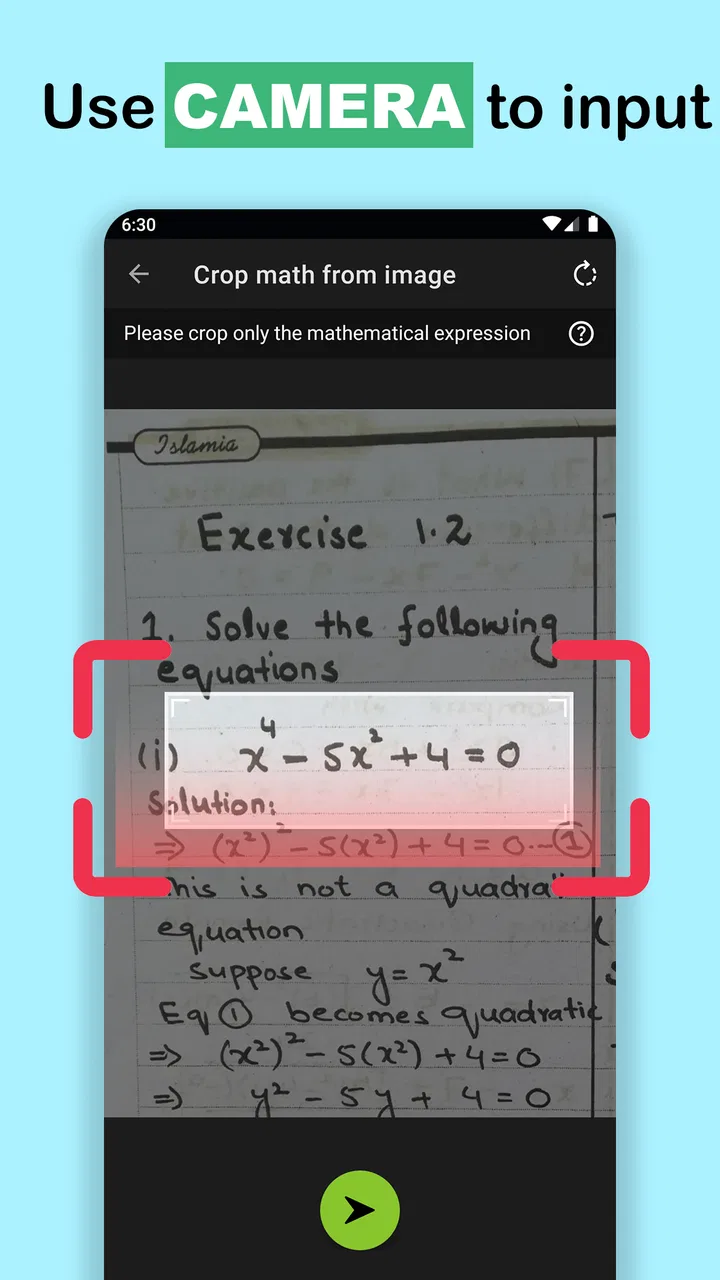
That distinction matters. This is not an app that teaches every concept from the beginning with guided explanations. I found it more useful as a working tool: enter an expression, inspect a graph, solve an equation, check a fraction, and compare the result with my handwritten work. For students, parents, and anyone sharing a device at home, that makes it practical, although it also means the user needs to understand what the answer represents.
The app is free to install and is suitable for Everyone. It has reached over a million installs, with a 4.6 average from around fourteen thousand ratings and roughly two thousand reviews. Those figures suggest that it has found a steady audience among people looking for a more serious calculator, but they do not remove the need to consider whether its interface suits the person who will actually use it.
You May Also Like

 Blood Strike: 2.5 Anniversary
Blood Strike’s Loadouts Turn Every Drop Into a Tactical Gamble
A close look at Blood Strike’s custom loadouts: how fast access to signature weapons reshapes its battle royale rhythm, rewards preparation, and narrows the gap between fights.

 Pandora - Music & Podcasts
Pandora’s Music Is Easy to Start, but Harder to Recover
Pandora’s strength is its low-effort path from a seed to a station. Its weak spot is how much confidence it asks you to place in connection, setup, and quiet recovery.

 8 Ball Pool
 Is Built on Rivalries, Rematches, and Routine
A close look at the rivalries, rematches, shared routines, and unanswered safety questions that turn a quick pool match into a persistent mobile community.

 Samsung Music
’s Quiet Strength Is Playing What You Already Own
Its reach comes less from spectacle than from dependable access to a personal library. That simplicity is both the app’s strongest retention engine and its ceiling.

 AccuWeather: Weather Radar
AccuWeather Review: A Quick, Clear Forecast for Everyday Decisions
For everyday plans, the best forecast is the one you can understand quickly. AccuWeather makes rain timing, radar, and local conditions easy to act on, with a few trade-offs.

 Hill Climb Racing
Why Hill Climb Racing Still Turns Crashes Into One More Run
A tiny car, a bumpy hill and one more upgrade: Hill Climb Racing keeps resurfacing because its simple chaos makes every near-miss feel personal.
More From Our News Desk



How it works on a shared household device
A realistic use case is a family tablet or phone that moves between people during the day. A student may use it for a graphing assignment, a parent may check a percentage or rearrange an equation, and another family member may only need a quick fraction calculation. Because this is a calculator rather than a social platform, the household experience is naturally simple: each person opens it and works with the mathematical tools available on the screen.
That simplicity is useful when several people rely on the same device. There is no need to create a profile just to solve a quadratic expression, and the app does not turn a shared mathematics task into a separate account-management project. On the other hand, users should not assume that a shared calculator keeps each person’s work neatly separated. If you are passing the device around, clear the current expression or start a fresh calculation before handing it to someone else.
I found that small habit more important than it sounds. A complicated graph or a long equation can remain visible, and the next person may mistake it for their own starting point. In a household, I would treat the screen like a sheet of scrap paper: check what is already there, reset the working area when appropriate, and avoid relying on the app as a private notebook for multiple users.
The strongest shared-device scenario is therefore short, focused sessions. One person checks a result, another plots a function, and the device goes back to ordinary use. If your family expects a full homework history for each child, separate saved projects, or a parent dashboard, this is not the right kind of tool to depend on. It works best as an accessible calculator that people use one at a time.
What I would do before handing it to a child
I would first open the app myself and try the main tasks the child is expected to perform. Graphing calculators can feel familiar to an experienced student but confusing to someone who has only used a four-function calculator. The important question is not merely whether the app can produce an answer; it is whether the student can enter the expression correctly and understand the result.
I would also agree on a simple routine: write the problem down first, use the calculator to test or explore it, and then compare the screen with the written method. That prevents the app from becoming an answer vending machine. For fractions and algebra especially, the useful learning moment often comes from spotting why two forms are equivalent, not from seeing one final number.
There is another practical boundary: do not let a younger user treat every displayed result as automatically correct. A missing parenthesis, an incorrect sign, or a wrong variable can produce a perfectly neat-looking answer to the wrong problem. I see this as a limitation of the category rather than a flaw unique to this app, but the touchscreen format makes careful entry especially important.
Setup, boundaries, and everyday coordination
The app runs on Android devices using Android 7.0 or later, so compatibility is broad enough for many older phones and tablets. Its current version is 7.5.1.483. I would still test it on the actual household device before assigning it to a student, because a compatible operating system does not guarantee that every screen will feel equally comfortable on every display size.
Installation itself is straightforward because the app is free. There are optional in-app purchases priced from ninety-nine cents to three dollars and ninety-nine cents per item. In a shared household, I would make sure everyone understands that free installation does not necessarily mean every optional item is included without charge. The safest approach is to keep purchasing decisions with the device owner and explain that a child should not approve anything independently.
That is a useful boundary even when the calculator is being used for schoolwork. A student may see an optional feature or purchase prompt while trying to continue, and a quick tap can become an avoidable expense. I would set the expectation before the first homework session: use the free tools freely, but ask before selecting anything that appears to cost money.
There is no reason to give the app more personal information than the task requires. For ordinary calculations, the student can work with the mathematical expression itself rather than entering names, addresses, grades, or family details. I prefer that approach on a shared device because it keeps the app’s role narrow and makes it easier for everyone to understand what belongs in the calculator.
Coordination also matters when several people need the device at the same time. A parent checking a household budget may not want to interrupt a student who is examining a graph. I would agree on short turns or use another calculator for simple arithmetic while the graphing work is in progress. The app is more valuable when someone needs its advanced functions; using it for every small addition can create unnecessary competition for the screen.
A practical homework workflow
For a student working on a function, I would begin on paper by identifying the variable, the expected range, and the shape or behavior that should appear. Then I would enter the expression, inspect the graph, and compare the visible behavior with the prediction. This is more informative than typing numbers until one matches the answer key.
A particularly useful habit is to change one part of an expression at a time. If the graph looks wrong, do not erase everything immediately. Check the sign, the exponent, the placement of parentheses, and the variable. This turns the app into a debugging tool for mathematical notation. It also helps a parent support the student without simply supplying the correct answer.
For equations, I would keep the original problem visible on paper and use the calculator to verify a proposed solution. Substitute the result back into the original equation rather than trusting the solver blindly. With fractions, compare the calculator’s result with a manually simplified form. These checks are quick and reveal whether the error came from the mathematics or from entry.
Another non-obvious strength is the ability to move between different kinds of mathematical thinking in one place. A student can calculate a value, look at a graph, and then return to algebraic manipulation without changing to a separate basic-calculator app. That reduces friction during mixed assignments, although it does not replace a textbook explanation when the underlying concept is unclear.
Where coordination becomes difficult
The main friction in a shared environment is continuity. If one person leaves a graph or equation on the screen, the next user may not know which settings or expression produced it. I would encourage users to say what they are doing before passing the device over, especially if the calculation is part of a longer assignment.
I would also avoid treating the app as a shared record of household calculations. It is better for temporary work than for tracking who solved what, when it was solved, or which version of an equation was used. If a result matters, copy the expression and answer into the student’s notebook or the family’s chosen notes system. That keeps the app focused and prevents confusion later.
For a parent helping remotely, the easiest coordination method is to ask the student to read the full expression aloud, including brackets, powers, and negative signs. A screenshot may show the result but not always explain what the student intended to enter. Talking through the expression often exposes the mistake faster than looking at the final number.
Age, trust, and the right level of independence
The Everyone content rating makes the app suitable for a broad audience, but suitability is not the same as independence. A younger child can use it for arithmetic and fractions with guidance, while a secondary-school student may be able to handle graphing and equation solving more confidently. The right level of supervision depends on mathematical maturity, not simply age.
I would trust an older student to use it independently after checking that they understand the difference between checking work and replacing work. For a younger learner, I would sit nearby during the first few sessions and ask questions such as “What did you expect the graph to do?” or “How can we verify this answer?” That keeps the calculator connected to reasoning.
The app is also a reasonable option for adults who want to refresh algebra without opening a full course platform. I like that it does not force a lesson structure on someone who already knows the basics. A parent can use it to check a child’s homework, explore a formula, or handle a fraction without needing a separate educational account.
Still, I would not recommend it as the only mathematics resource for someone who is struggling with foundational ideas. The app can show and solve, but a learner may need worked examples, explanations of terminology, or feedback on why a method works. A dedicated learning platform or a teacher is better when the problem is conceptual rather than computational.
Trust also includes academic honesty. In my view, the healthiest household rule is to use the app after attempting the problem, unless the assignment specifically allows calculator support from the start. Its graphing and solving abilities can make difficult work look easy, but the student still needs to know how to interpret the output and explain the steps.
Who should choose something else
I would skip this app if your main goal is a guided mathematics course with lessons, quizzes, progress tracking, or personalized teaching. A graphing calculator is a tool, not a complete curriculum. It may confirm that an answer is wrong without teaching the exact idea the student has misunderstood.
I would also choose a physical calculator when tactile buttons, exam rules, or distraction-free operation are priorities. A phone or tablet brings notifications, other apps, and the temptation to switch tasks. For classroom or test situations, the permitted calculator policy matters more than the app’s capabilities.
On the other hand, I would choose this app over a basic calculator when visualizing a function is part of the work. I would also choose it over a collection of separate small math apps when the same person regularly moves between graphs, equations, algebra, and fractions. The advantage is not that every tool is perfect; it is that the workflow stays in one mathematical workspace.
My household verdict
After using it as both a personal calculator and a shared household tool, I see Graphing calculator plus 84 83 as a strong practical choice for students and adults who already have a clear question to investigate. Its free entry point, broad Android compatibility, education focus, and combination of graphing and algebra functions make it more useful than the calculator that comes preinstalled on most phones.
I especially like it for the moment when a written solution needs a second perspective. A graph can reveal behavior that a single answer hides, while equation and fraction tools can help check the details. The best results come when the user predicts, enters, inspects, and verifies rather than skipping straight to the final number.
For a shared device, I would set three boundaries: clear the screen between users, keep purchases with the device owner, and save important work somewhere separate. Those habits address the real household issues without pretending that a calculator needs profiles or family-management features. The app remains simple, but the people using it need a little coordination.
My recommendation is strongest for secondary-school students, parents supporting homework, and anyone who wants a capable graphing calculator without paying upfront. I would be more cautious for very young learners, students who need step-by-step teaching, or families expecting organized individual histories. In those cases, a learning app, a physical calculator, or a separate notes workflow may be a better companion.
Overall, this is a useful Android education app when you treat it as a mathematical instrument rather than an automatic tutor. The rating of 4.6 and its large user base reflect its appeal, but its real value in my experience comes from how it fits into a careful routine: think first, calculate second, and use the displayed result as evidence to examine rather than an answer to accept without question.
FAQs for Graphing calculator plus 84 83
01What is Graphing Calculator Plus 84 83, and who is it designed for?
Graphing Calculator Plus 84 83 is a mobile calculator app designed to reproduce many of the functions and layout familiar to users of classic graphing calculators. It is aimed at students, teachers, and anyone who needs help with algebra, trigonometry, statistics, equations, tables, and graph plotting. Before downloading, users should check whether its supported features match the calculator model or classroom requirements they normally use.
02Can Graphing Calculator Plus 84 83 graph equations and display tables of values?
Yes, the app is primarily intended for graphing and mathematical exploration. You can generally enter functions, view their plots, adjust the visible graph area, and inspect corresponding values in a table. In my experience, the usefulness depends on entering expressions correctly and understanding the calculator’s notation. It is a helpful study companion, but users should still verify important answers manually or with their teacher’s preferred method.
03Does the app include advanced functions such as statistics, trigonometry, and equation solving?
Graphing Calculator Plus 84 83 offers more than basic arithmetic, with tools commonly associated with advanced scientific and graphing calculators. Depending on the version and device, this may include trigonometric functions, logarithms, powers, statistics, matrices, and equation-related calculations. Feature availability can change between updates, so students should review the current store description if they specifically need a particular function for school, exams, or technical work.
04Is Graphing Calculator Plus 84 83 free to download, and are there advertisements or in-app purchases?
The app’s download model may vary by platform, region, and version. Some editions can be installed for free while including advertising, optional purchases, or premium features, whereas other versions may require payment. I recommend checking the Google Play Store or Apple App Store listing before installing, especially the sections covering ads, in-app purchases, and subscriptions. This will help avoid surprises when unlocking extra tools or removing advertising.
05Can Graphing Calculator Plus 84 83 replace a physical calculator during classes or exams?
The app can be a convenient replacement for practice, homework, and everyday calculations, particularly when you want graphing tools on your phone or tablet. However, it should not automatically be considered acceptable for examinations. Many schools restrict smartphones or require an approved calculator model. Before relying on it in class or during a test, confirm your institution’s rules and learn the app’s input system so it does not slow you down.
Pros
- Familiar layout makes the transition from a physical TI-83/84 easy.
- Supports multiple graphing modes for equations
- inequalities
- and functions.
- Useful for checking homework results without needing an internet connection.
- Compact design works well on phones and tablets.
- Quickly displays tables and graph intersections for visual problem solving.
Cons
- The interface can feel cramped on smaller phone screens.
- Some advanced calculator functions may require in-app purchases.
- Graph rendering may slow down with many complex equations.
- It may take time to learn where less common calculator commands are.
- Not an officially licensed Texas Instruments calculator emulator.

Graphing calculator plus 84 83
Gallery